Showing posts with label Free Tools. Show all posts


Looking for a premium quality WordPress theme? But, don’t want to spend a dime? Don’t waste your time turning the whole world wide web upside down! Just take a look at WordPress Max theme by Gabfire web design. From AJAX control panel for theme options to fully optimized magazine/newspaper style front page, all features in this theme are premium. And the good thing is that it is available for free download.

With WordPress Max theme, in the front page of your WordPress powered blog, you will be able to display featured posts, latest posts and categorized posts along with auto-cropped and resized thumbnails. Then there is a carousel in the middle for displaying posts by large pictures. In the sidebar you can display most viewed posts, most commented posts, tags etc with the help of AJAX tabs. There is also a video panel to play latest videos on sidebar. Then there are 4 advertising positions that can be controlled directly from the theme control panel. With so many features and options available on this theme, you can easily create a content rich, news blog, powered by WordPress. Take a look at the demo and download it today.

Overview of WordPress Max theme features:

  • Premium quality news style WordPress theme.
  • Ajaxed Control Panel for theme settings and options.
  • Thumbnails created on the fly with cropping and resizing for best quality.
  • Sidebar AJAX tabs (most viewed, most commented, tags etc).
  • Video panel to play latest videos on sidebar.
  • Custom 404, archives, video templates..
  • Four advertising positions that can be controlled directly in the control panel.
  • Theme is fully widgetized with 3 sidebars.
  • Ability to manage all thumbnail sizes in control panel.
  • Flickr gallery scrollbar with options built in.
  • Beautiful carousel to scroll between posts by large pictures.
  • Gravatars support built-in.
  • Trackbacks are separated from comments.
  • Show author picture, posts, and info below each post.
  • FeedBurner built in - can be setup in control panel.
  • Custom jQuery panel for quick social bookmarking for posts.
  • Theme is split in several CSS and html template files for easiest access and edit.
  • Available for free download.

Demo | Release Page | Download Link


Read more...


Computer languages have undergone dramatic evolution since the first electronic computers were built to assist in telemetry calculations during World War II. Early on, programmers worked with the most primitive computer instructions: machine language. These instructions were represented by long strings of ones and zeroes. Soon, assemblers were invented to map machine instructions to human-readable and -manageable mnemonics, such as ADD and MOV. In time, higher-level languages evolved, such as BASIC and COBOL. These languages let people work with something approximating words and sentences, such as Let I = 100. These instructions were translated back into machine language by interpreters and compilers. An interpreter translates a program as it reads it, turning the program instructions, or code, directly into actions. A compiler translates the code into an intermediary form. This step is called compiling, and produces an object file. The compiler then invokes a linker, which turns the object file into an executable program. Because interpreters read the code as it is written and execute the code on the spot, interpreters are easy for the programmer to work with. Compilers, however, introduce the extra steps of compiling and linking the code, which is inconvenient. Compilers produce a program that is very fast each time it is run. However, the time-consuming task of translating the source code into machine language has already been accomplished. Another advantage of many compiled languages like C++ is that you can distribute the executable program to people who don't have the compiler. With an interpretive language, you must have the language to run the program.

<Read Online Only Here>


Read more...


If you are trying to make some game or anything related to graphics then this is your first choice. This is free and almost compete to most paid soft of similar kind. So download now. Click here to download.


Read more...

ROBO is a new and very simple educational programming language that will familiarize you with the basics of computer science by programming your own robot. In addition to an introduction into popular programming techniques, you will also gain insight into areas such as robotics and artificial intelligence.

Download this freeware here


Read more...

This file will change the Icons and names of the Recycle Bin, my computer, and Network Neighborhood for you. It will even restore the defaults when you want. FREEWARE. Note you should delete the file ShellIconCache after making the changes. This file will rebuild itself after rebooting. FREEWARE

Grab this freeware here


Read more...

This tools will allow the translation of Google technologies available so that they are in the work flow can be accessed directly from your desktop - without visiting the Google Translator pages via browser. You can translate text, phrase, or paragraph directly or by load file (.txt or .doc). You can translate a website too, just put the website URL and click “Translate”. You can use hotkey for fast access. It can translate various language : English >> German, German >> English, French >> German, German >> French, English >> French, English >> Italian, English >> Portuguese, English >> Spanish, French >> English, Italian >> English, Portuguese >> English, Spanish >> English. Thanks to Smartcoder who has develop this handy tools.

Download Desktop Google Translator from SmartCoder.Net >>

Screenshot of Desktop Google Translator


Read more...

FontStruct is a free font-building (font creator font/designer) that build by famous font retailer FontShop.

Fontstruct equipped with easy to use user interface so you can quickly and easily create fonts constructed out of geometrical shapes, which are arranged in a grid pattern, like tiles or bricks. Be creative and create your own fonts store it to gallery and share it to the others. Once you’re done building, FontStruct generates high-quality TrueType fonts, ready to use in any Mac or Windows application. You can download another user fonts and custom it with your own style and variations.


Read more...

For many people learning by example is the optimal way to pick up a new programming language, idea, or technique. But finding that ideal piece of code to look at and learn from isn’t always easy. That’s where code search engines and snippet libraries come into play.

The seven listed below are the top places we could find that will help you locate the piece of code you’ve been looking for. But as always, if we’re missed any, please let us know in the comments below.

Popular open source code repository and version control web service GitHub launched a new Code Search feature today. Even though it’s the new kid on the block, GitHub has become super popular in a very short space of time and hosts a ton of public repositories. In a blog post, GitHub’s Scott Chacon classifies the amount of code searched as “a lot.”


Krugle claims to search over 2.5 billion lines of open source code, making them one of the largest source code search engines on the web. They claim to reach over a third of all developers world wide, and their enterprise search product powers code search for Amazon Web Services, IBM developerWorks, Collab.net, SourceForge.net, and Yahoo! Developer Network.

Koders, which claims to search over a billion lines of code, seems to be a favorite among Ruby programmers. In a press release announcing the company’s acquisition by Black Duck Software last month, the site revealed the Ruby searches were up 20-fold over the past four years and have passed PHP, Perl, and Python. Ruby is now the fourth most searched for language on the site behind only Java, C/C+ and C#.

Codase is the little guy on the block, weighing in at just 250 million lines of code searched, according to the site. That might be because development on the search engines appears to have stalled a couple of years ago. Codase focuses mainly on Linux C/C++ open source projects and appears out of date, so unless that’s what you’re looking for, there are better options out there.

With over 13,000 users contributing to over 5,000 code snippets, the DZone Snippets library is a great place to find good code examples. It’s certainly not the easiest site to browse, but there is some gold hidden for those who look. Exercise patience and you may find exactly what you need at DZone’s site.

Snipplr is a nicely designed code snippet library that has less users than DZone (just under 10,000), but more code snippets to crawl through — almost 8,000. And it seems to be gaining steam — more than half of the site’s snippets were added in the past year, even though the site is over 2 years old. Oh, and they have handy plugins for Textmate, Gedit, and Wordpress, and bookmarklets for Firefox and Safari. Very nicely executed.


Last, but certainly not least, is Google Code Search, the grand daddy of all code search engines. While the people at Krugle and Koders may argue the point, and Google doesn’t say how many lines of code they’re searching, when you’re talking search, Google is always the team to beat. Their code search engine searches a ton of public source code repositories — including GitHub, Sourceforge, and their own Google Code site. And Google supports a ton of languages.

BONUS: O’Reilly Code Search: Book publisher O’Reilly lets you search over 123,000 examples covering over 2.6 million lines of code taken from their books. Almost 700 of them.


Read more...


An effective web design is one in which your users are able to find information quickly and in a logical fashion.

Do they visit the content you want them to visit? Are they looking in the right places of your web page? Are you able to keep your user’s attention, or do they just leave quickly?

It’s not just about the content either. If your design loads slowly - or if moving from one section to another takes a long time - it affects the user’s experience.

These things can be the make-or-break factors between a user clicking on a link to find more information, or the back button to find it elsewhere.

Some things to consider:

  • Are important information being seen by the user?
  • Are the navigation and action items intuitive?
  • Is the user being directed to sections in a logical manner?
  • Does the web page load quickly enough to not turn away the user?

If you’re interested in analyzing and optimizing your page layout - here’s some extremely useful tools that you can use to help.

1. ClickHeat

ClickHeat is an open source visual tool for showing “hot” and “cold” zones of a web page. It allows you to see which spots users click on most, and which spots are being ignored.


It’s very easy to implement on your website, you only have to include an external JavaScript file.

Download: Clickheat on SourceForge.net.

2. Crazy Egg

Crazy Egg offers a myriad of analytical tools to help you visualize what visitors are doing.

Features include: Confetti - allowing you to see what people are clicking on based on certain factors such as their operating system and where they came from, Overlay - providing you with tons of data about particular links, and Report sharing - enabling you to share the data with team members and clients.

The free version only allows 4 pages to be tracked - so use your top landing pages to get the most data.

3. YSlow for Firebug

A key tenet of a strong design is that, not only should information be presented in a logical and elegant fashion, but that it must also be served quickly, with very little delay.

YSlow for Firebug is a free tool for Mozilla Firefox that gives you information about your front-end design to see if it performs well. It gives you a letter grade (A through F) and outlines your web page’s trouble spots.

It’s based on the Yahoo! Developer Network’s “Best Practices for Speeding Up Your Web Site” initially written by Steve Souders, who was once the Chief of Performance at Yahoo! and is now working over at Google on web performance and open source initiatives.

Downloads: Firebug extension for Firefox (required) and YSlow.

4. clickdensity

clickdensity is a full suite of usability analysis tools that will help you assess your web page design.

You can use heat maps showing where users click on the most, hover maps - which shows people scrolling over links but not clicking on them, and A/B Tests which allows you to change certain page elements to see which style is more effective.

The free subscription give you 5,000 clicks and only one page and one site to monitor.

5. ClickTale

ClickTale offers a lot of user data pertaining to how visitors use your website.

There are plenty of things you can look at such as average time it takes for a user to click on a link, a user’s hesitation on clicking a link, hover to click ratio, and much more. It also provides detailed reports and charts on your users’ monitor sizes to better optimize your web page design to cater for the typical visitor.

6. Clicky

Perhaps the most interesting feature that Clicky has is its real-time tracking and monitoring feature, called Spy (check out the demo here).

Besides Spy, there’s a host of other analytics data you can look at such as user Actions - which records click data from your users and Visitors - providing you user data.

7. Google Analytics

One of the best free services that Google offers is Google Analytics and probably the most well-known analytics tool. It’s incredibly easy to install and offers plenty of user and content data to help you learn more about your web pages’ performance.

It has a feature called Site Overlay, which gives you a visual representation of the popular places your users like to click on. It also offers data on bounce rates and your top exit pages (to see what pages make users leave).

So there they are, some of the best tools in the market to help you troubleshoot and optimize your page layout. In the end, it’s a combination of great content, as well as how you present this content — that will lead to an effective design.


Read more...

You can make writing code as complicated as you want, but at the end of the day, all you really need is your favorite, trusty text editor. You can use a simple one like Microsoft’s Notepad, but oftentimes it’s helpful to have a text editor that has syntax highlighting/coloring, support for multiple languages, a robust find and replace feature, and other features and options that make writing code just a tad bit easier.

If you’re in search of a good, free text editor – you’ve come to the right place. Below you’ll find 12 first-class free text editors that are designed with coders’ needs in mind. Whether you use a Windows, Mac, or Linux machine – you’ll find a few options here that will satisfy your code-authoring needs.


NOTEPAD++

(Windows)

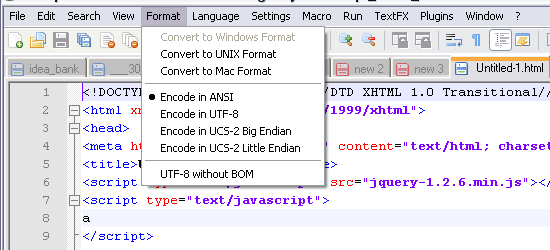
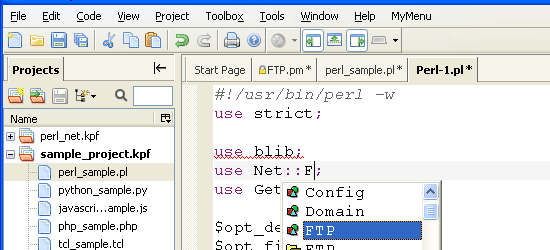
NOTEPAD++ is the premier replacement for Microsoft’s Notepad. It has an auto-completion feature (for most supported languages) that guesses what you’re trying to write, a tabbed interface which is great for working with multiple files without cluttering your task bar, a powerful RegEx find-and-replace feature, code folding, support for a large array of languages (even Assembler!) and much more. These are just some of the features that make NOTEPAD++ my personal default text editor.

Bluefish Editor

(Mac, Linux)

Bluefish Editor is a robust, open source text editor geared towards programmers and web designers. It’s known as being a fast, lightweight text editor that can open 500+ documents with ease. It has a built-in function reference browser (for PHP, Python, CSS, and HTML) so you can quickly learn about with particular syntaxes. Check out the Screenshots section to find movies/screencasts (such as learning about working with remote files) and screen shots of Bluefish Editor.

TextWrangler

(Mac)


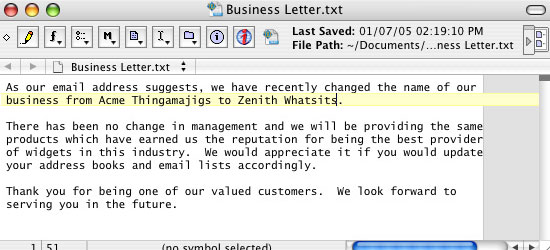
TextWrangler is a multi-purpose text editor for the Mac OS. It is a programmer-friendly text editor and Unix/Server Admin text editor. It has a useful "plugin" system allowing developers a way for extending TextWrangler’s built-in features. It also has a function browser so that you can quickly find and jump to the function you’re looking for (very helpful for those really long files).

Smultron

(Mac)

Smultron is an easy-to-use text editor. Its simple interface makes it perfect for the minimalist coder. It has the basic features you’d expect from a text editor such as syntax highlighting/coloring but also has cool, helpful features such as the ability to split the viewing pane in two so that you can view files side-by-side, a code snipplet library to allow you to store your often-used code blocks, and a full-screen mode that’s intended to make you focus on the task at hand.

Caditor

(Windows)

Caditor is an open source portable text editor written in the .NET framework (C#) that puts speed and performance at the forefront of its design. It has a convenient search box built into the tool bar of the text editor’s interface so that you don’t have to open another dialog box to perform a search. It has other handy features common to developer-oriented text editors such as line numbering, a compiler feature to allow you to hook it up with your compiler, and FTP feature.

gedit

(Linux)

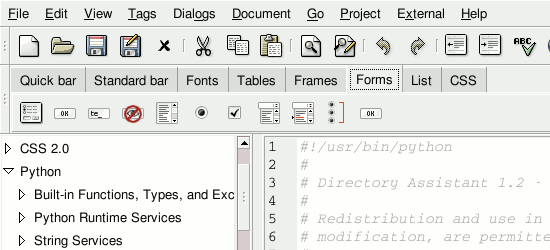
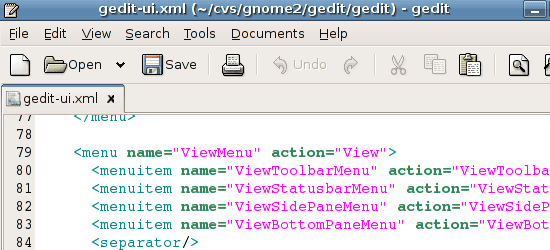
gedit is the official text editor of the GNOME desktop. Unlike Microsoft’s built-in text editor (Notepad), gedit is a more feature-packed text editor geared towards usage for programming and mark-up. With its syntax highlighting, tabbed interface for editing multiple files, and spell-checking feature – gedit is an excellent, free text editor for coders.

GNU Emacs

(Windows, Mac, Linux)

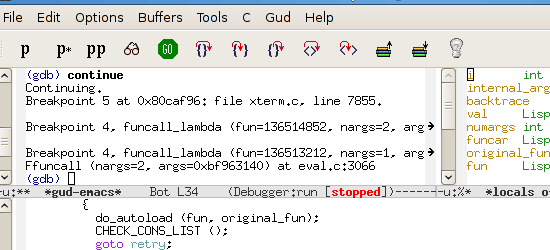
GNU Emacs (more commonly referred to simply as Emacs) is a cross-platform, extendible text editor geared towards programmers. One of its defining features is Emacs’s ability to be extended – offering you the ability to use it as your project planner and debugger, among other things. It has a file-comparison feature (M-x ediff) that highlights differences between two files (useful for figuring out changes in a file made by coders who don’t document/comment their revisions).

Crimson Editor

(Windows)

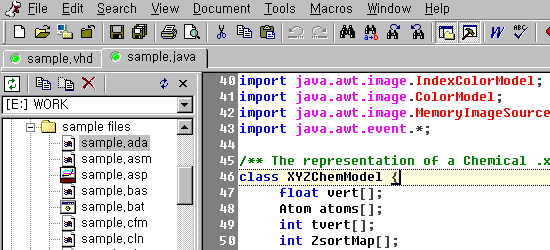
Crimson Editor is a light-weight text editor for Windows that supports many languages. It has a "Macros" features which lets you record a sequence of tasks so that you can reuse the sequence with a click of a button. It has a built-in FTP feature, allowing you to upload/download files from your FTP server. Crimson Editor is a solid option for Windows users.

ConTEXT

(Windows)

ConTEXT is another excellent, light-weight, freeware (meaning it’s free - but close-sourced) text editor for Windows. It has countless of handy features such as text sorting (helpful when you need to sort things in alphabetical order, for example), ability to export configuration options so that you can share your configuration or import it into several machines, and a macro recorder for repeating a sequence of tasks. In 2007, ConTEXT development was turned over to David Hadley but continues to be freeware.

SciTE

(Windows, Linux)

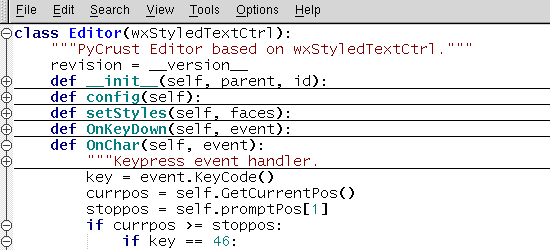
SciTE, written on top of the open source Scintilla code-editing component, is a speedy text editor aimed for use in source code editing. It has a standalone .exe version which you can use for portable storage drives (i.e. USB flash drives) so that you can conveniently carry it around and use it on any computer without having to install it. SciTE is a compatible with Windows and Linux operating systems and has been tested by the developer on Windows XP and on Fedora 8 and Ubuntu 7.10.

Komodo Edit

(Windows, Mac, Linux)

Komodo Edit is a freeware, cross-platform text editor created by ActiveState. It is a simple text editor based on the popular integrated development environment - Komodo IDE. It has a convenient and flexible Project Manager feature to help you organize and keep track of your project files.

jEdit

(Windows, Mac, Linux)

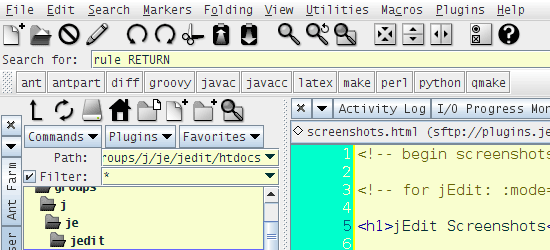
jEdit is a text editor that specifically caters to programmers. It’s written in Java and runs on any operating system that supports You can download a ton of plugins (check out the Plugins Central on jEdit’s website) to extend its built-in features. jEdit was designed to combine the best features of Windows, Mac, and Unix text editors.

Additional Resources

What do you think?

There’s a ton of text editors out there so be sure to share your experiences and opinions on the text editors above, and if your favorite isn’t on the list – please tell me about it in the comments.


Read more...


If you want to create your own screensaver, you must have a screensaver maker software. There is lots of screensaver maker software outthere : Axialis Screensaver Producer, Ace Pro Screensaver Creator, Easy Screensaver Studio and many more … But as always … We try to found information about free screensaver creator, and finally we found InstantStorm. Yeah … this is free software, and you know ? this software build by two young programmers 18 years old from Czech Republic : Jan Kola?ík and Ond?ej Vaverka. Thanks to them :).

The main features of InstantStorm :

  • 100% free for all purposes: non-commercial and even commercial with unlimited redistribution
  • Screensaver scale options
  • Easy to use WYSIWYG designers for your screensaver’s installer, uninstaller and settings dialog
  • Wizard mode for beginners
  • Interactive screensavers support
  • Customizable screensaver icon file
  • Ability to create screensaver desktop and Start menu shortcuts
  • External files support (when your SWF file requires external files like TXT or AS, InstantStorm allows you to include them)
Download Free Screensaver Creator - InstantStorm


--------------------------------------------------------


Human do error, please email:- webmaster@piyadas-world.com if you find any. Please visit http://www.piyadas-world.com for more resource.


Read more...


Have you ever by accidental deleting your urgent files ?. Don’t be panic, this freeware may useful to recover your deleted files. This is free for personal use, for business environment you must pay $69 Business License. As told at their website, the program does not install any spyware or adware along with it. It does not populate user’s desktop with pop-up ads or forcefully subscribe user to mailing lists. So it is safe to use.

Visit FreeUnDelete website, and don’t forget to read “Proper Usage Techniques

--------------------------------------------------------


Human do error, please email:- webmaster@piyadas-world.com if you find any. Please visit http://www.piyadas-world.com for more resource.


Read more...


Here is a e-book which let you help to learn basic java programming. The book full of good example. All that effort will make your beginning in java programming world more comfortable.

Download
--------------------------------------------------------


Human do error, please email:- webmaster@piyadas-world.com if you find any. Please visit http://www.piyadas-world.com for more resource.


Read more...


You probably use Google everyday, but do you know... the Google Snake Game? Googledromes? Memecodes? Googlesport? The Google Calculator? Googlepark and Google Weddings? Google hacking, fighting and rhyming? In this book, you’ll find Google-related games, cartoons, oddities, tips, stories and everything else that’s fun.

Source : www.55fun.com
Author : Philipp Lenssen
Download

--------------------------------------------------------


Human do error, please email:- webmaster@piyadas-world.com if you find any. Please visit http://www.piyadas-world.com for more resource.


Read more...

Everyday in net you will may surf many site but only few of them you remember. Today I found a great informatic site about latest happening on net. The site full of useful topic. The site is http://www.tothetech.com . The article is taken from there. I hope you like this post. This is a good research tool.

Statbrain is a online web stats tool to find out number of page views to any website or blog.

Statbrain uses Alexa rank, Links to Google, yahoo, Altavista, and Alltheweb as background info to calculate number of visitors.

The numvber of visitors is not accurate, statbrain just calculates the approximate visitors and pageviews.
Visit : www.statbrain.com


--------------------------------------------------------


Human do error, please email:- webmaster@piyadas-world.com if you find any. Please visit http://www.piyadas-world.com for more resource.


Read more...

This is not rich in one night thing. You have to work hard to do it. Today I am going to reveal the secret of earning money with out investing a single penny. This is not email reading or click on ad. This is natural, scientific, more realistic plan. You know very well how google increasing there business. The more they grow, the more you earn. All you need to get your AdSense account. For that you have to have a website. There are both two way to get it, one is free and other is paid. So, what you choose. I think it will be better not to invest to much now. So, we will go with free one right. So, our plan is set.

Now, the next step, what will be the type of our site will be. Is it going to be a forum, blog, CMS? what? If you going to work alone or with 2 or 3 friend then it is better to go with blog. It is easy to get and work too. So, we decide we will go with blog. Now there are several site which will allow you to make a free blog. You can make a google search with " create free blog". So, you have many choice in your hand now. Which one going to be the better to get the AdSense account fast? I think that will be blogger.com . The site is a sister site of google and automatically index, crawl whole site. And that's why this is better. Most importantly blogger have AdSense gadget by which you can apply and get a free account instantly, though there will be only public serving ad till your site approval. But your blog name should be alias of your thought. If you thinking about game site, then your site name must be something about game.

Now, we have a site. Choose a template which will match with your site type. Like, if you choose an article or news type site then your template should look simple, if your site about entertainment, then it should be colorful. Hope you understand what I'm saying.

Now the most important thing is content. You should make a habit to create your own content. The more the content is different, the presentation is different, the more user attract. Your site should not an information board of bunch of thing. Your site should generate specific type of article, so the user will know exactly what are you doing, don't confuse them with lot of topic.

Now, you have a healthy ratio of content. So what are you waiting for apply for AdSense via AdSense gadget of blogger. We will discuss about advertising to get more traffic other day.

--------------------------------------------------------


Human do error, please email:- webmaster@piyadas-world.com if you find any. Please visit http://www.piyadas-world.com for more resource.


Read more...

Earn Money In Net with Adsence

Posted by Arafat | 8:16 PM | | 0 comments »

Google no doubt the no 1 in net to give you a ability to earn money. So, how you should do that. The secrete reveal in this free e-books. Small books with necessary information.

Download the .pdf file here

--------------------------------------------------------
Human do error, please email:- webmaster@piyadas-world.com if you find any. Please visit http://www.piyadas-world.com for more resource.


Read more...

Secure Your Personal Computer

Posted by Arafat | 8:07 PM | | 0 comments »

If you on a net, you have to secure your self from unwanted threads but how. Anti-virus, anti-firewall is not enough. Here is a book, which might help you.

Secure Your Personal Computer
By: Ian Del Carmen

A few easy, cost-effective steps you can take to make your computer more secure to begin.

Download the .pdf file here

--------------------------------------------------------
Human do error, please email:- webmaster@piyadas-world.com if you find any. Please visit http://www.piyadas-world.com for more resource.


Read more...

Free Text To PDF Converter

Posted by Arafat | 7:50 PM | | 0 comments »


If you want to create your own e-books or want to minimize the space of your document then this tools is very much necessary for you. It's free.

Free Text To PDF Converter introduction

Text To PDF Converter is a free program that can be used to convert plain text file to PDF file, it doesn't depend on the Acrobat or Acrobat Reader application, it supports command line operation, you can call it from other applications to convert your text files to PDF files on the fly. It converts old txt, text, textual report to nice PDF file (form, invoice, report, sale sheet) on all Windows Systems.

Text To PDF Converter is can only convert plain text files to PDF files, if you need convert Word DOC, HTML, PPT, XLS, RTF, etc. files to PDF files, please download and install PDFcamp Printer, DocConverter COM or docPrint from our website, these products all can convert DOC, HTML, PPT, XLS, RTF, etc. files to PDF files.

Free Text To PDF Converter Features


* Searchable text base on the generated PDF files;
* Force font size, font name, font color and paper size;
* Support PDF custom page size;
* Support PDF custom page margin and tab size;
* Full install/uninstall support;
* Ability to process reports that do not contain form feeds;
* Support command line operation (for manual use or inclusion in scripts);
* Generated PDF files can be opened in the all versions of Acrobat Reader product.
* Do NOT need Adobe Acrobat software;
* Support all Windows platforms, 95/98/ME/NT/2000/XP/2003/Vista;
* Batch convert text files to PDF files;
* Support drag and drop files;
* Acrobat compatible encryption and rights protection;
* Password protection for PDF files with 40 or 128 bit encryption;
* Set file permissions to restrict printing, copying, and future modifications to the document;
* Auto open PDF file after creation;
* Support 90,180,270 page rotation;
* Support Portrait and Landscape page orientation;
* Support system fonts and 14 predefined fonts;
* Recognize page break symbol automatically within text to PDF conversion;
* Control n lines per page for advanced users;
* Control line spacing for text to PDF conversion;

Download


--------------------------------------------------------
Human do error, please email:- webmaster@piyadas-world.com if you find any. Please visit http://www.piyadas-world.com for more resource.


Read more...

Free C,C++ Compiler/IDE

Posted by Arafat | 3:45 PM | | 0 comments »

Some of you may not buy visual studio CD. Don't worry here is a free excellent c++ tools. Now you will never miss VS.
Here is a small description taken from there site.

Bloodshed Dev-C++ is a full-featured Integrated Development Environment (IDE) for the C/C++ programming language. It uses Mingw port of GCC (GNU Compiler Collection) as it's compiler. Dev-C++ can also be used in combination with Cygwin or any other GCC based compiler.

Features are :

- Support GCC-based compilers
- Integrated debugging (using GDB)
- Project Manager
- Customizable syntax highlighting editor
- Class Browser
- Code Completion
- Function listing
- Profiling support
- Quickly create Windows, console, static libraries and DLLs
- Support of templates for creating your own project types
- Makefile creation
- Edit and compile Resource files
- Tool Manager
- Print support
- Find and replace facilities
- CVS support
Download

Home Page
--------------------------------------------------------
Human do error, please email:- webmaster@piyadas-world.com if you find any. Please visit http://www.piyadas-world.com for more resource.


Read more...